用青龙面板配置NodeSeek自动签到收鸡腿+自动同步Cookie脚本
前言
NodeSeek 是MJJ们聊天吹牛消磨时间的地方。论坛每天签到送鸡腿,现在把青龙脚本签到部署方法整理分享出来。
签到效果
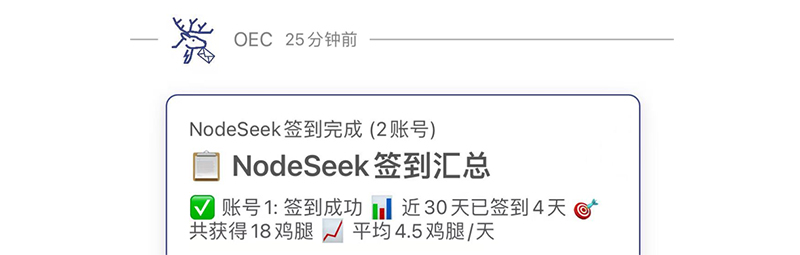
温馨提示: NS在墙外,签到环境也同时需要。
部署方法
1、先抓取NodeSeek社区的Cookie备用,抓取方法:打开页面登录账号按F12,刷新页面。复制Cookie,如下图: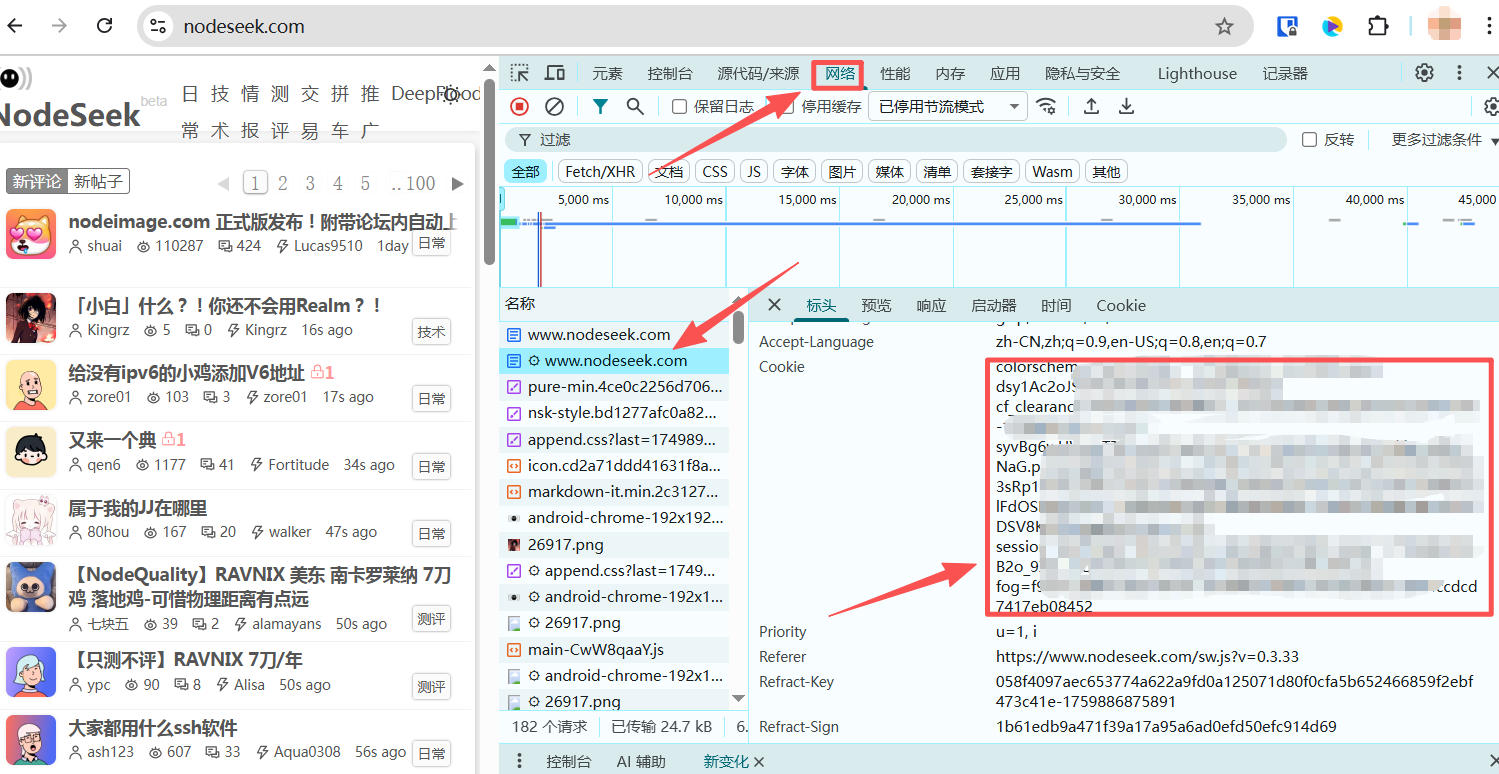
2、进入青龙面板脚本管理里面,添加脚本nodeseek.py,如所示:
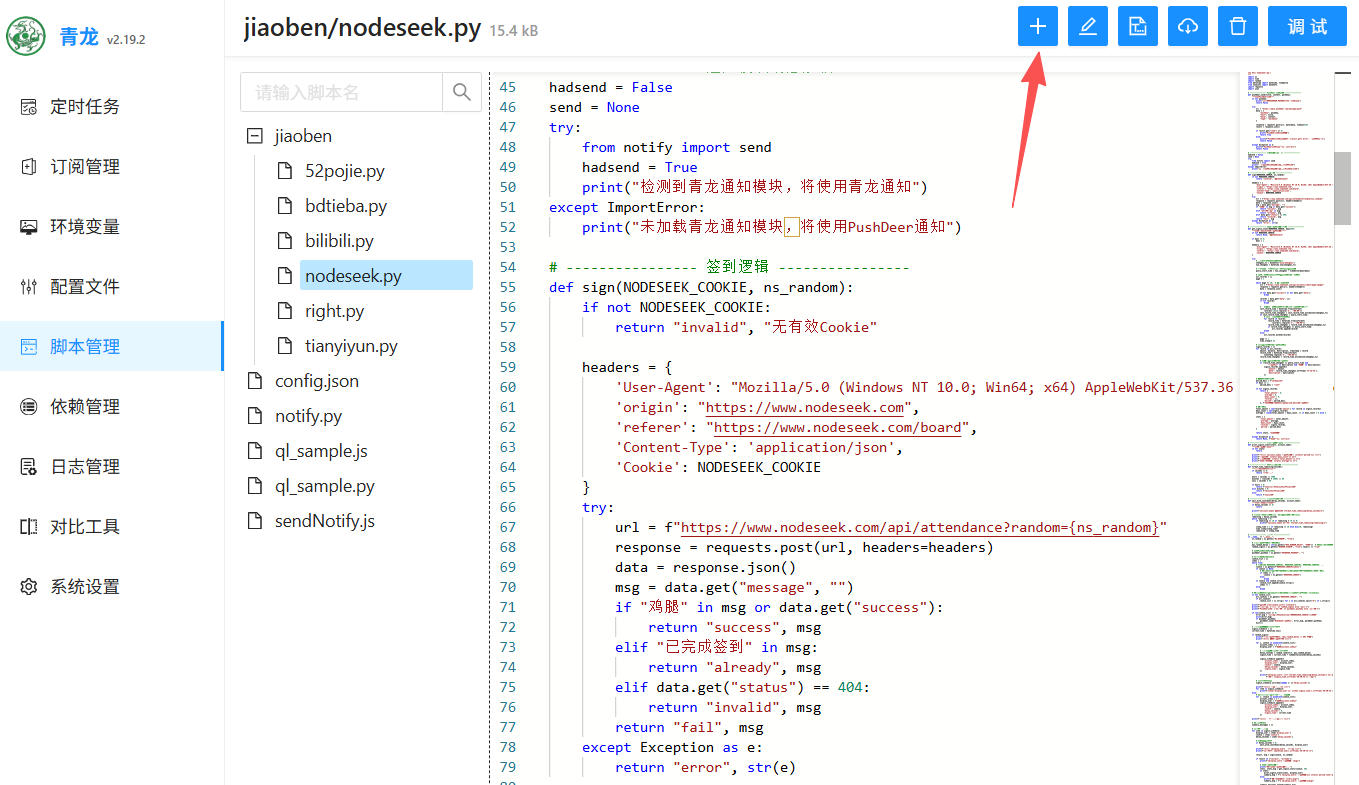
3、进环境变量添加Cookie变量。如果有多个,添加多行。格式如下:
- NODESEEK_COOKIE1:刚才抓取的Cookie
- NODESEEK_COOKIE2:Cookie
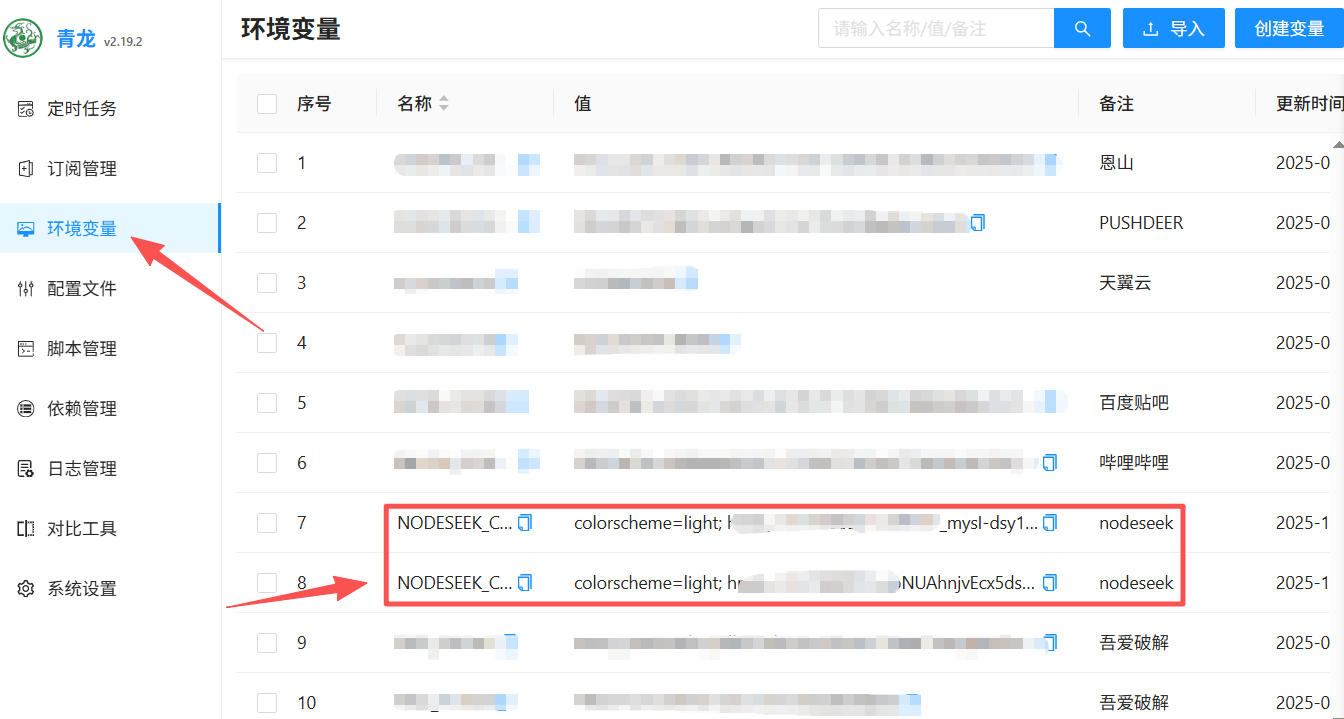
4、点左侧定时任务添加定时任务,名称随意,命令脚本task jiaoben/nodeseek.py(注意你的脚本路径),定时规则自行设置,也可以直接抄我的,每天早上9点18分运行。
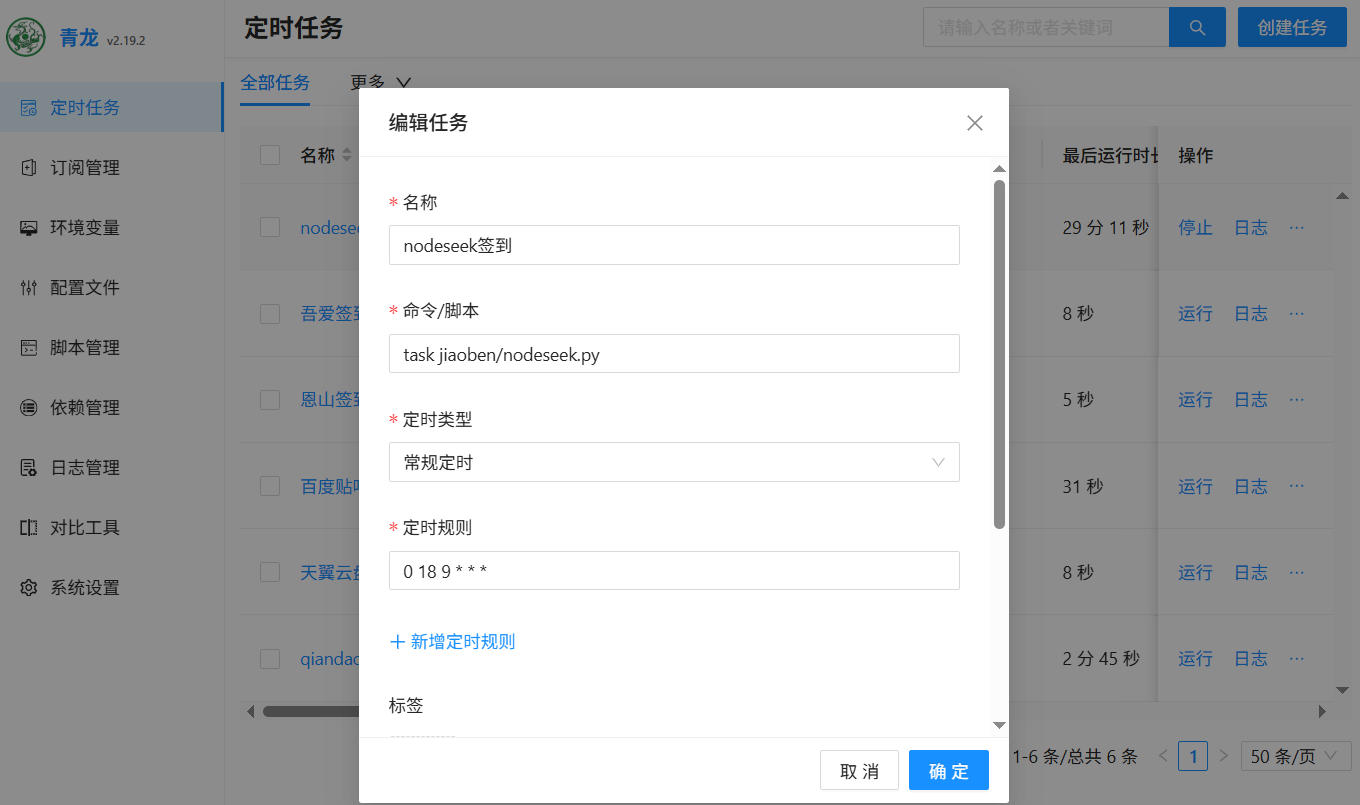
5、添加完成后手动运行一次无报错即可。
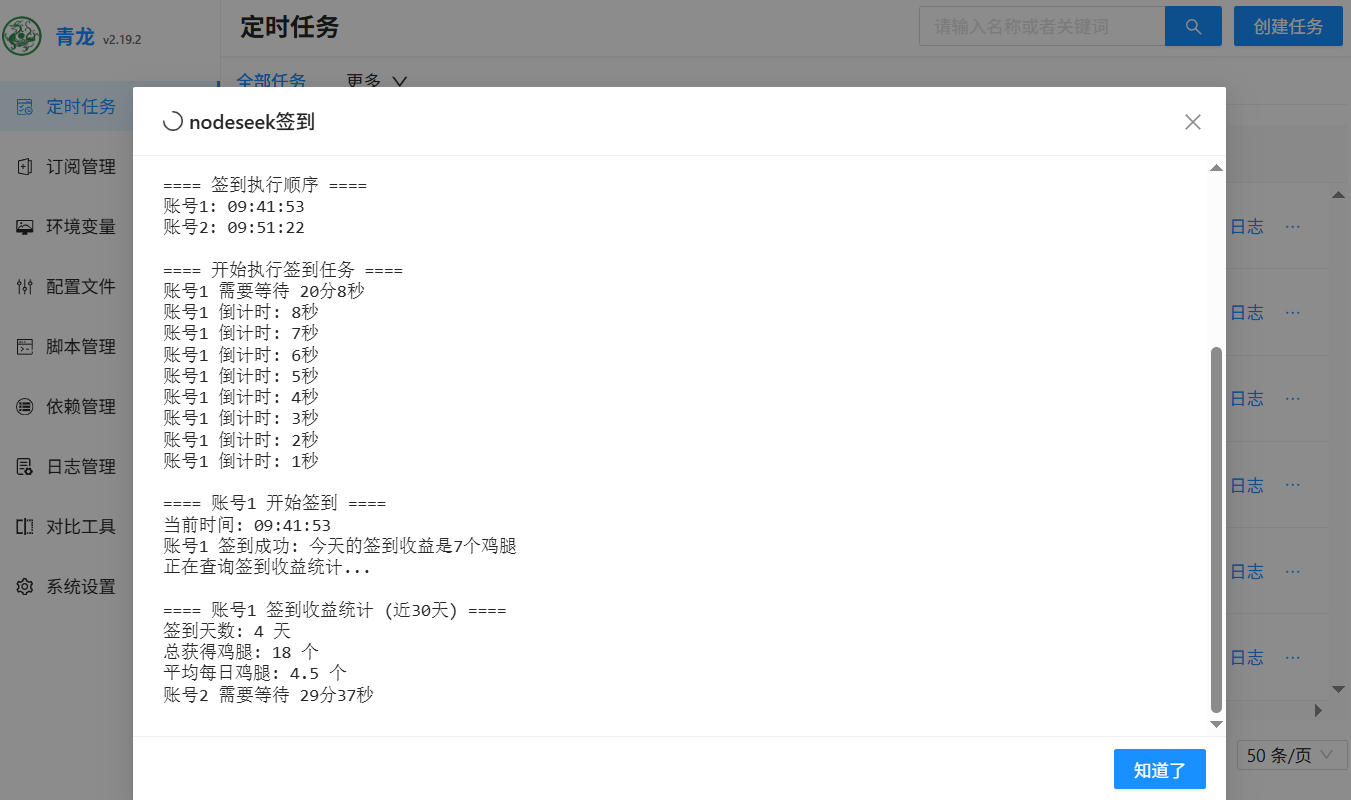
最后,可以配置推送通知,也可以不用配置。
附上签到脚本
# -*- coding: utf-8 -*-
"""
cron "23 14 * * *" script-path=xxx.py,tag=匹配cron用
new Env('nodeseek签到')
"""
import os
import time
import random
from datetime import datetime, timedelta
from zoneinfo import ZoneInfo
import requests
import json

# ---------------- PushDeer 通知模块 ----------------
def pushdeer_send(title, content, pushkey):
    """发送PushDeer通知"""
    if not pushkey:
        print("未设置PUSHDEER_PUSHKEY,跳过通知发送")
        return False

    try:
        url = "https://api2.pushdeer.com/message/push"
        data = {
            "pushkey": pushkey,
            "text": title,
            "desp": content,
            "type": "markdown"
        }

        response = requests.post(url, data=data, timeout=10)
        result = response.json()

        if result.get("code") == 0:
            print("PushDeer通知发送成功")
            return True
        else:
            print(f"PushDeer通知发送失败: {result.get('error', '未知错误')}")
            return False

    except Exception as e:
        print(f"PushDeer通知发送异常: {str(e)}")
        return False

# ---------------- 通知模块动态加载 ----------------
hadsend = False
send = None
try:
    from notify import send
    hadsend = True
    print("检测到青龙通知模块,将使用青龙通知")
except ImportError:
    print("未加载青龙通知模块,将使用PushDeer通知")

# ---------------- 签到逻辑 ----------------
def sign(NODESEEK_COOKIE, ns_random):
    if not NODESEEK_COOKIE:
        return "invalid", "无有效Cookie"

    headers = {
        'User-Agent': "Mozilla/5.0 (Windows NT 10.0; Win64; x64) AppleWebKit/537.36 (KHTML, like Gecko) Chrome/125.0.0.0 Safari/537.36 Edg/125.0.0.0",
        'origin': "https://www.nodeseek.com",
        'referer': "https://www.nodeseek.com/board",
        'Content-Type': 'application/json',
        'Cookie': NODESEEK_COOKIE
    }
    try:
        url = f"https://www.nodeseek.com/api/attendance?random={ns_random}"
        response = requests.post(url, headers=headers)
        data = response.json()
        msg = data.get("message", "")
        if "鸡腿" in msg or data.get("success"):
            return "success", msg
        elif "已完成签到" in msg:
            return "already", msg
        elif data.get("status") == 404:
            return "invalid", msg
        return "fail", msg
    except Exception as e:
        return "error", str(e)

# ---------------- 查询签到收益统计函数 ----------------
def get_signin_stats(NODESEEK_COOKIE, days=30):
    """查询前days天内的签到收益统计"""
    if not NODESEEK_COOKIE:
        return None, "无有效Cookie"

    if days <= 0:
        days = 1

    headers = {
        'User-Agent': "Mozilla/5.0 (Windows NT 10.0; Win64; x64) AppleWebKit/537.36 (KHTML, like Gecko) Chrome/125.0.0.0 Safari/537.36 Edg/125.0.0.0",
        'origin': "https://www.nodeseek.com",
        'referer': "https://www.nodeseek.com/board",
        'Cookie': NODESEEK_COOKIE
    }

    try:
        # 使用UTC+8时区(上海时区)
        shanghai_tz = ZoneInfo("Asia/Shanghai")
        now_shanghai = datetime.now(shanghai_tz)

        # 计算查询开始时间:当前时间减去指定天数
        query_start_time = now_shanghai - timedelta(days=days)

        # 获取多页数据以确保覆盖指定天数内的所有数据
        all_records = []
        page = 1

        while page <= 10:  # 最多查询10页
            url = f"https://www.nodeseek.com/api/account/credit/page-{page}"
            response = requests.get(url, headers=headers)
            data = response.json()

            if not data.get("success") or not data.get("data"):
                break

            records = data.get("data", [])
            if not records:
                break

            # 检查最后一条记录的时间,如果超出查询范围就停止
            last_record_time = datetime.fromisoformat(
                records[-1][3].replace('Z', '+00:00'))
            last_record_time_shanghai = last_record_time.astimezone(shanghai_tz)
            if last_record_time_shanghai < query_start_time:
                # 只添加在查询范围内的记录
                for record in records:
                    record_time = datetime.fromisoformat(
                        record[3].replace('Z', '+00:00'))
                    record_time_shanghai = record_time.astimezone(shanghai_tz)
                    if record_time_shanghai >= query_start_time:
                        all_records.append(record)
                break
            else:
                all_records.extend(records)

            page += 1
            time.sleep(0.5)

        # 筛选指定天数内的签到收益记录
        signin_records = []
        for record in all_records:
            amount, balance, description, timestamp = record
            record_time = datetime.fromisoformat(
                timestamp.replace('Z', '+00:00'))
            record_time_shanghai = record_time.astimezone(shanghai_tz)

            # 只统计指定天数内的签到收益
            if (record_time_shanghai >= query_start_time and
                    "签到收益" in description and "鸡腿" in description):
                signin_records.append({
                    'amount': amount,
                    'date': record_time_shanghai.strftime('%Y-%m-%d'),
                    'description': description
                })

        # 生成时间范围描述
        period_desc = f"近{days}天"
        if days == 1:
            period_desc = "今天"

        if not signin_records:
            return {
                'total_amount': 0,
                'average': 0,
                'days_count': 0,
                'records': [],
                'period': period_desc,
            }, f"查询成功,但没有找到{period_desc}的签到记录"

        # 统计数据
        total_amount = sum(record['amount'] for record in signin_records)
        days_count = len(signin_records)
        average = round(total_amount / days_count, 2) if days_count > 0 else 0

        stats = {
            'total_amount': total_amount,
            'average': average,
            'days_count': days_count,
            'records': signin_records,
            'period': period_desc
        }

        return stats, "查询成功"

    except Exception as e:
        return None, f"查询异常: {str(e)}"

# ---------------- 显示签到统计信息 ----------------
def print_signin_stats(stats, account_name):
    """打印签到统计信息"""
    if not stats:
        return

    print(f"\n==== {account_name} 签到收益统计 ({stats['period']}) ====")
    print(f"签到天数: {stats['days_count']} 天")
    print(f"总获得鸡腿: {stats['total_amount']} 个")
    print(f"平均每日鸡腿: {stats['average']} 个")

# ---------------- 时间格式化函数 ----------------
def format_time_remaining(seconds):
    """格式化剩余时间显示"""
    if seconds <= 0:
        return "立即执行"

    hours = seconds // 3600
    minutes = (seconds % 3600) // 60
    secs = seconds % 60

    if hours > 0:
        return f"{hours}小时{minutes}分{secs}秒"
    elif minutes > 0:
        return f"{minutes}分{secs}秒"
    else:
        return f"{secs}秒"

# ---------------- 随机延迟等待函数 ----------------
def wait_with_countdown(delay_seconds, account_name):
    """带倒计时的延迟等待"""
    if delay_seconds <= 0:
        return

    print(f"{account_name} 需要等待 {format_time_remaining(delay_seconds)}")

    # 显示倒计时(每10秒显示一次,最后10秒每秒显示)
    remaining = delay_seconds
    while remaining > 0:
        if remaining <= 10 or remaining % 10 == 0:
            print(f"{account_name} 倒计时: {format_time_remaining(remaining)}")

        sleep_time = 1 if remaining <= 10 else min(10, remaining)
        time.sleep(sleep_time)
        remaining -= sleep_time

# ---------------- 主流程 ----------------
if __name__ == "__main__":
    ns_random = os.getenv("NS_RANDOM", "true")

    # 随机签到时间窗口配置(秒)
    max_random_delay = int(os.getenv("MAX_RANDOM_DELAY", "3600"))  # 默认1小时=3600秒
    random_signin = os.getenv("RANDOM_SIGNIN", "true").lower() == "true"

    # 获取PushDeer的PushKey
    pushdeer_pushkey = os.getenv("PUSHDEER_PUSHKEY", "")

    # 从环境变量读取Cookie
    cookie_list = []
    index = 1
    while True:
        # 尝试读取 NODESEEK_COOKIE1, NODESEEK_COOKIE2, NODESEEK_COOKIE3, ...
        cookie = os.getenv(f"NODESEEK_COOKIE{index}")
        if cookie is None:
            # 如果没有找到带数字的变量,尝试读取不带数字的变量(兼容旧配置)
            if index == 1:
                cookie = os.getenv("NODESEEK_COOKIE")
            else:
                break
        if cookie and cookie.strip():
            cookie_list.append(cookie.strip())
            index += 1
        else:
            break

    # 如果上面没有找到cookie,尝试从旧的格式读取(用&分隔的多个cookie)
    if not cookie_list:
        all_cookies = os.getenv("NODESEEK_COOKIE", "")
        if all_cookies:
            cookie_list = [c.strip() for c in all_cookies.split("&") if c.strip()]

    print(f"共发现 {len(cookie_list)} 个Cookie")
    print(f"随机签到: {'启用' if random_signin else '禁用'}")
    print(f"PushDeer通知: {'已配置' if pushdeer_pushkey else '未配置'}")

    if len(cookie_list) == 0:
        error_msg = "未找到任何Cookie,请设置NODESEEK_COOKIE环境变量"
        print(error_msg)
        if pushdeer_pushkey:
            pushdeer_send("NodeSeek签到错误", error_msg, pushdeer_pushkey)
        exit(1)

    # 为每个账号生成随机延迟时间
    signin_schedule = []
    current_time = datetime.now()

    if random_signin:
        print(f"随机签到时间窗口: {max_random_delay // 60} 分钟")
        print("\n==== 生成签到时间表 ====")

        for i, cookie in enumerate(cookie_list):
            account_index = i + 1
            display_user = f"账号{account_index}"

            # 为每个账号随机分配延迟时间
            delay_seconds = random.randint(0, max_random_delay)
            signin_time = current_time + timedelta(seconds=delay_seconds)

            signin_schedule.append({
                'account_index': account_index,
                'display_user': display_user,
                'cookie': cookie,
                'delay_seconds': delay_seconds,
                'signin_time': signin_time
            })

            print(f"{display_user}: 延迟 {format_time_remaining(delay_seconds)} 后签到 "
                  f"(预计 {signin_time.strftime('%H:%M:%S')} 签到)")

        # 按延迟时间排序
        signin_schedule.sort(key=lambda x: x['delay_seconds'])

        print(f"\n==== 签到执行顺序 ====")
        for item in signin_schedule:
            print(f"{item['display_user']}: {item['signin_time'].strftime('%H:%M:%S')}")
    else:
        # 不启用随机签到,立即执行所有账号
        for i, cookie in enumerate(cookie_list):
            account_index = i + 1
            display_user = f"账号{account_index}"
            signin_schedule.append({
                'account_index': account_index,
                'display_user': display_user,
                'cookie': cookie,
                'delay_seconds': 0,
                'signin_time': current_time
            })

    print(f"\n==== 开始执行签到任务 ====")

    # 汇总通知消息
    summary_messages = []

    # 按计划执行签到
    for item in signin_schedule:
        display_user = item['display_user']
        cookie = item['cookie']
        delay_seconds = item['delay_seconds']

        # 等待到指定时间
        if delay_seconds > 0:
            wait_with_countdown(delay_seconds, display_user)

        print(f"\n==== {display_user} 开始签到 ====")
        print(f"当前时间: {datetime.now().strftime('%H:%M:%S')}")

        result, msg = sign(cookie, ns_random)

        if result in ["success", "already"]:
            print(f"{display_user} 签到成功: {msg}")

            # 查询签到收益统计
            print("正在查询签到收益统计...")
            stats, stats_msg = get_signin_stats(cookie, 30)
            if stats:
                print_signin_stats(stats, display_user)
                summary_msg = f"✅ {display_user}: 签到成功\n📊 {stats['period']}已签到{stats['days_count']}天\n🎯 共获得{stats['total_amount']}鸡腿\n📈 平均{stats['average']}鸡腿/天"
            else:
                print(f"统计查询失败: {stats_msg}")
                summary_msg = f"✅ {display_user}: 签到成功\n{msg}"

            summary_messages.append(summary_msg)

            # 发送通知
            if hadsend:
                try:
                    notification_msg = f"{display_user} 签到成功:{msg}"
                    if stats:
                        notification_msg += f"\n{stats['period']}已签到{stats['days_count']}天,共获得{stats['total_amount']}个鸡腿,平均{stats['average']}个/天"
                    send("NodeSeek 签到", notification_msg)
                except Exception as e:
                    print(f"发送青龙通知失败: {e}")

        else:
            error_msg = f"❌ {display_user}: 签到失败\n{msg}"
            print(f"{display_user} 签到失败: {msg}")
            summary_messages.append(error_msg)

            if hadsend:
                try:
                    send("NodeSeek 签到失败", f"{display_user} 签到失败:{msg}")
                except Exception as e:
                    print(f"发送青龙通知失败: {e}")

    print(f"\n==== 所有账号签到完成 ====")
    print(f"完成时间: {datetime.now().strftime('%Y-%m-%d %H:%M:%S')}")

    # 发送PushDeer汇总通知
    if pushdeer_pushkey and summary_messages:
        try:
            title = f"NodeSeek签到完成 ({len(cookie_list)}账号)"
            content = "## 📋 NodeSeek签到汇总\n\n"
            content += "\n\n".join(summary_messages)
            content += f"\n\n⏰ 完成时间: {datetime.now().strftime('%Y-%m-%d %H:%M:%S')}"

            pushdeer_send(title, content, pushdeer_pushkey)
        except Exception as e:
            print(f"发送PushDeer汇总通知失败: {e}")

    # 如果没有配置任何通知方式,但需要发送失败通知
    elif not hadsend and not pushdeer_pushkey:
        # 检查是否有失败的任务,如果有则尝试使用第一个cookie发送通知
        failed_messages = [msg for msg in summary_messages if "❌" in msg]
        if failed_messages and cookie_list:
            print("检测到签到失败但未配置通知,无法发送失败提醒")
NodeSeek Cookie 自动同步到青龙面板教程
前言
NodeSeek 的登录 Cookie 大约每 7-8 天失效一次,加上登录页面有 Cloudflare Turnstile 人机验证,无法通过脚本自动登录刷新。本教程通过油猴脚本,在你正常登录 NodeSeek 后自动将 Cookie 同步到青龙面板环境变量,彻底解决手动更新的烦恼。
准备工作
- 青龙面板(已部署并可访问)
- 浏览器已安装 Tampermonkey 插件
- NodeSeek 账号
第一步:青龙面板创建应用
油猴脚本调用青龙 API 需要应用凭证,不是面板的登录账号密码。
- 登录青龙面板
- 点击左侧菜单 「系统设置」
- 切换到 「应用管理」 标签
- 点击 「新建应用」
- 填写应用名称,例如
tampermonkey - 权限勾选 「环境变量」
- 点击确认创建
- 创建成功后复制生成的 ClientID 和 ClientSecret,后面要用
第二步:安装油猴脚本
- 浏览器点击 Tampermonkey 图标 → 「管理面板」
- 点击 「+」 新建脚本
- 清空默认内容,粘贴以下完整代码:
// ==UserScript==
// @name         NodeSeek Cookie 自动同步到青龙
// @namespace    https://blog.upx8.com/4863
// @version      1.9
// @description  登录后自动将 Cookie 同步到青龙环境变量 NODESEEK_COOKIE1
// @match        https://www.nodeseek.com/*
// @grant        GM_setValue
// @grant        GM_getValue
// @grant        GM_xmlhttpRequest
// @connect      ql.xxxxxxx.com   //输入面板地址
// ==/UserScript==

(function () {
    'use strict';

    const CONFIG = {
        QL_URL: 'ql.xxxxxxx.com',   //输入面板地址
        CLIENT_ID: '填你的ClientID',
        CLIENT_SECRET: '填你的ClientSecret',
        ENV_NAME: 'NODESEEK_COOKIE1',
        // 这些字段变化才触发同步,忽略频繁变动的字段
        WATCH_KEYS: ['session', 'fog', 'cf_clearance'],
    };

    function showToast(msg, success = true) {
        const existing = document.getElementById('ql-sync-toast');
        if (existing) existing.remove();
        const toast = document.createElement('div');
        toast.id = 'ql-sync-toast';
        toast.innerText = msg;
        toast.style.cssText = `
            position: fixed; bottom: 30px; right: 20px;
            z-index: 2147483647;
            background: ${success ? '#3D6C45' : '#c0392b'};
            color: white; padding: 12px 20px; border-radius: 8px;
            font-size: 14px; font-family: sans-serif;
            box-shadow: 0 4px 12px rgba(0,0,0,0.4);
            max-width: 320px; word-break: break-all;
        `;
        document.body.appendChild(toast);
        setTimeout(() => {
            toast.style.opacity = '0';
            setTimeout(() => toast.remove(), 500);
        }, 5000);
    }

    function parseCookie(str) {
        const obj = {};
        if (!str) return obj;
        str.split(';').forEach(part => {
            const idx = part.indexOf('=');
            if (idx < 0) return;
            const k = part.slice(0, idx).trim();
            const v = part.slice(idx + 1).trim();
            if (k) obj[k] = v;
        });
        return obj;
    }

    // 只提取关键字段的值拼成字符串用于对比
    function extractWatchValues(cookieStr) {
        const obj = parseCookie(cookieStr);
        return CONFIG.WATCH_KEYS
            .map(k => `${k}=${obj[k] || ''}`)
            .join('; ');
    }

    function mergeCookieStr(a, b) {
        const objA = parseCookie(a);
        const objB = parseCookie(b);
        Object.keys(objB).forEach(k => {
            if (!(k in objA)) objA[k] = objB[k];
        });
        return Object.entries(objA).map(([k, v]) => `${k}=${v}`).join('; ');
    }

    function qlRequest(method, path, token, body) {
        return new Promise((resolve, reject) => {
            GM_xmlhttpRequest({
                method,
                url: CONFIG.QL_URL + path,
                headers: {
                    'Content-Type': 'application/json',
                    ...(token ? { 'Authorization': `Bearer ${token}` } : {})
                },
                data: body ? JSON.stringify(body) : undefined,
                timeout: 10000,
                onload: (res) => {
                    try { resolve(JSON.parse(res.responseText)); }
                    catch (e) { reject(new Error(`解析失败: ${res.responseText}`)); }
                },
                onerror: () => reject(new Error('网络请求失败,检查青龙地址是否可访问')),
                ontimeout: () => reject(new Error('请求超时'))
            });
        });
    }

    async function getQlToken() {
        const data = await qlRequest('GET',
            `/open/auth/token?client_id=${CONFIG.CLIENT_ID}&client_secret=${CONFIG.CLIENT_SECRET}`
        );
        if (data.code === 200) return data.data.token;
        throw new Error(`获取Token失败: ${JSON.stringify(data)}`);
    }

    async function syncToQingLong(cookie) {
        showToast('🔄 正在同步 Cookie 到青龙...');
        const token = await getQlToken();
        const envData = await qlRequest('GET', `/open/envs?searchValue=${CONFIG.ENV_NAME}`, token);
        const envs = envData.data || [];
        const target = envs.find(e => e.name === CONFIG.ENV_NAME);

        if (target) {
            await qlRequest('PUT', '/open/envs', token, {
                id: target.id,
                name: CONFIG.ENV_NAME,
                value: cookie,
                remarks: `NodeSeek自动同步 ${new Date().toLocaleString()}`
            });
        } else {
            await qlRequest('POST', '/open/envs', token, [{
                name: CONFIG.ENV_NAME,
                value: cookie,
                remarks: `NodeSeek自动同步 ${new Date().toLocaleString()}`
            }]);
        }
        GM_setValue('last_synced_cookie', cookie);
        GM_setValue('last_watch_values', extractWatchValues(cookie));
        showToast('✅ Cookie 已自动同步到青龙!');
        console.log('[QL同步] 同步完成,关键字段:', extractWatchValues(cookie));
    }

    // 显示手动输入框(首次使用 / 关键字段失效时)
    function showInputDialog(reason) {
        if (document.getElementById('ql-cookie-dialog')) return Promise.resolve(null);

        const mask = document.createElement('div');
        mask.id = 'ql-cookie-dialog';
        mask.style.cssText = `
            position: fixed; inset: 0; z-index: 2147483646;
            background: rgba(0,0,0,0.5);
            display: flex; align-items: center; justify-content: center;
        `;
        const box = document.createElement('div');
        box.style.cssText = `
            background: white; border-radius: 10px; padding: 24px;
            width: 540px; max-width: 90vw; font-family: sans-serif;
            box-shadow: 0 8px 32px rgba(0,0,0,0.3);
        `;
        box.innerHTML = `
            <div style="font-size:16px;font-weight:bold;margin-bottom:8px;">
                🍪 ${reason}
            </div>
            <div style="font-size:13px;color:#666;margin-bottom:12px;">
                F12 → Network → 点任意请求 → 标头 → 复制 Cookie 字段完整内容
            </div>
            <textarea id="ql-cookie-input" style="
                width:100%;height:90px;box-sizing:border-box;
                border:1px solid #ddd;border-radius:6px;padding:8px;
                font-size:12px;resize:vertical;
            " placeholder="colorscheme=light; session=xxx; fog=xxx; cf_clearance=xxx ..."></textarea>
            <div style="display:flex;gap:10px;margin-top:12px;justify-content:flex-end;">
                <button id="ql-cookie-skip" style="
                    padding:8px 16px;border:1px solid #ddd;border-radius:6px;
                    background:white;cursor:pointer;font-size:13px;
                ">跳过</button>
                <button id="ql-cookie-save" style="
                    padding:8px 16px;border:none;border-radius:6px;
                    background:#3D6C45;color:white;cursor:pointer;font-size:13px;
                ">保存并同步</button>
            </div>
        `;
        mask.appendChild(box);
        document.body.appendChild(mask);

        return new Promise(resolve => {
            document.getElementById('ql-cookie-save').onclick = () => {
                const val = document.getElementById('ql-cookie-input').value.trim();
                mask.remove();
                resolve(val || null);
            };
            document.getElementById('ql-cookie-skip').onclick = () => {
                mask.remove();
                resolve(null);
            };
        });
    }

    async function main() {
        await new Promise(resolve => setTimeout(resolve, 2500));

        // 未登录跳过
        if (!document.cookie.includes('fog=') || !document.cookie.includes('smac=')) {
            console.log('[QL同步] 未登录,跳过');
            return;
        }

        const currentCookie = document.cookie;
        const lastWatchValues = GM_getValue('last_watch_values', '');
        const lastSyncedCookie = GM_getValue('last_synced_cookie', '');
        const currentWatchValues = extractWatchValues(
            mergeCookieStr(currentCookie, lastSyncedCookie)
        );

        console.log('[QL同步] 上次关键字段:', lastWatchValues || '(无记录)');
        console.log('[QL同步] 当前关键字段:', currentWatchValues);

        // 关键字段没变化,直接跳过
        if (lastWatchValues && currentWatchValues === lastWatchValues) {
            console.log('[QL同步] 关键字段无变化,无需同步');
            return;
        }

        // 有变化或首次使用
        const reason = lastWatchValues
            ? '检测到 Cookie 已更新,请重新粘贴完整 Cookie'
            : '首次使用,请粘贴完整 Cookie';

        console.log(`[QL同步] ${reason}`);

        // 已有 session 记录(合并后包含)则直接同步,否则弹框
        const mergedCookie = mergeCookieStr(currentCookie, lastSyncedCookie);
        if (mergedCookie.includes('session=')) {
            console.log('[QL同步] 合并后包含 session,直接同步');
            try {
                await syncToQingLong(mergedCookie);
            } catch (e) {
                console.error('[QL同步] 同步失败:', e);
                showToast(`❌ 同步失败: ${e.message}`, false);
            }
        } else {
            // 没有 session,弹框让用户粘贴
            const input = await showInputDialog(reason);
            if (input && input.includes('=')) {
                try {
                    await syncToQingLong(input);
                } catch (e) {
                    console.error('[QL同步] 同步失败:', e);
                    showToast(`❌ 同步失败: ${e.message}`, false);
                }
            } else {
                console.log('[QL同步] 用户跳过');
            }
        }
    }

    main();
})();- 修改顶部配置区三个值:
| 字段 | 说明 |
|---|---|
QL_URL |
青龙面板完整地址,如 https://ql.example.com |
CLIENT_ID |
第一步创建应用生成的 ClientID |
CLIENT_SECRET |
第一步创建应用生成的 ClientSecret |
- 同时把
@connect那行的域名也改成你的青龙域名(不含https://) - 按
Ctrl+S保存
第三步:首次同步(只需做一次)
因为 session 是 HttpOnly,JS 无法自动读取,首次需要手动粘贴一次完整 Cookie,之后全自动。
操作:
- 打开 https://www.nodeseek.com 并登录
- 页面加载后会弹出输入框
- 打开 F12 → Network → 点任意一个请求 → 标头 → 找到 Cookie 字段 → 复制完整内容
- 粘贴到弹框里 → 点**「保存并同步」**
- 右下角出现 ✅ Cookie 已自动同步到青龙! 表示成功
后续使用(全自动)
| 场景 | 脚本行为 |
|---|---|
| 正常浏览 NodeSeek | 检测关键字段无变化,静默跳过 |
| Cookie 未过期重新打开页面 | 静默跳过 |
| Cookie 过期重新登录 | 检测到字段变化,自动弹框提示粘贴 |
验证签到是否正常
去青龙手动运行一次签到脚本,看到以下内容说明一切正常:
账号1 签到成功: 获得了X个鸡腿常见问题
弹框没出现? 打开 F12 → Console,看有没有 [QL同步] 开头的日志,把内容发出来排查。
提示「获取Token失败」? ClientID / ClientSecret 填错了,重新去青龙应用管理确认。
提示「网络请求失败」? 青龙地址填写有误,或青龙面板不能从外网访问。
Cookie 过期后怎么知道要更新? 签到脚本会失败并推送通知,收到通知后打开 NodeSeek 登录,弹框会自动出现。